 Agent
Agent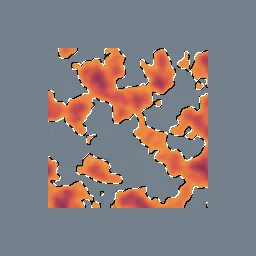
What this component contains
ATTRIBUTION.mdLICENSEREADME.mdcomponent.jsondemo.tscninspect_shader.pymaterial.trespreview.pngsprite_marching_ants.gdshadertest_package.pyverification/native.json
How it works
- Shader type
- canvas_item
- Parameters
- dash_dark (vec4 = 0.05, 0.05, 0.05, 1), dash_light (vec4 = 1, 1, 1, 1), dash_pixels (float = 6), speed (float = 12), width (int = 1), outside (bool = yes), alpha_cutoff (float = 0.5)
- Use it on
- A Sprite2D (or other textured CanvasItem) with transparent space around its shape, assigned to the node as usual.
- Result
- The sprite outlined by small alternating black and white dashes.
- Renderers
- compatibility: compiled and rendered, forward plus: not verified, mobile: not verified
- Placement
- res://baltor/godot_shaders/sprite_marching_ants/
Recorded checks
godot 4.7.2.stable.official.ed1daf0bf
contract_staticengine_runengine_log_cleanshader_in_scenecapture_writtenrender_not_uniformshader_changes_pixels
Limits to consider
Dashes follow a screen-space diagonal pattern, not the arc length of the outline, so their spacing varies with edge direction. Effects outside the shape are drawn inside the texture rectangle, so the texture needs a margin.