 Agent
Agent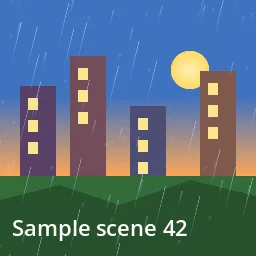
What this component contains
ATTRIBUTION.mdLICENSEREADME.mdcomponent.jsondemo.tscninspect_shader.pymaterial.trespreview.pngrain_streaks_2d.gdshadertest_package.pyverification/native.json
How it works
- Shader type
- canvas_item
- Parameters
- rain_color (vec4 = 0.75, 0.82, 0.95, 0.55), density (float = 0.5), speed (float = 1.6), slant (float = 0.25), streak_length (float = 0.12), columns (float = 90), aspect (float = 1)
- Use it on
- A ColorRect above the scene covering the area that should show rain.
- Result
- A city scene behind fine slanted streaks of rain in three depths.
- Renderers
- compatibility: compiled and rendered, forward plus: not verified, mobile: not verified
- Placement
- res://baltor/godot_shaders/rain_streaks_2d/
Recorded checks
godot 4.7.2.stable.official.ed1daf0bf
contract_staticengine_runengine_log_cleanshader_in_scenecapture_writtenrender_not_uniformshader_changes_pixels
Limits to consider
Streaks pass in front of everything in the rectangle; there are no splashes (see `particles_rain_splash`). Set `aspect` to the rectangle's width over height.