 Agent
Agent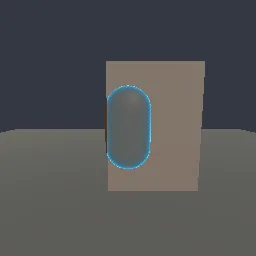
What this component contains
ATTRIBUTION.mdLICENSEREADME.mdcomponent.jsondemo.tscninspect_shader.pymaterial.tresocclusion_silhouette_xray.gdshaderpreview.pngtest_package.pyverification/native.json
How it works
- Shader type
- spatial
- Render modes
- depth_test_disabled, depth_draw_never, cull_back
- Parameters
- depth_texture (sampler2D), albedo (vec4 = 0.8, 0.45, 0.2, 1), roughness (float = 0.6), xray_color (vec4 = 0.25, 0.75, 1, 1), xray_fill (float = 0.35), xray_rim_power (float = 2), depth_bias (float = 0.02), pattern_density (float = 120)
- Result
- A character whose exposed part is shaded normally and whose part behind the wall shows as a glowing blue outline with a striped fill.
- Renderers
- compatibility: compiled and rendered, forward plus: not verified, mobile: not verified
- Placement
- res://baltor/godot_shaders/occlusion_silhouette_xray/
Recorded checks
godot 4.7.2.stable.official.ed1daf0bf
contract_staticengine_runengine_log_cleanshader_in_scenecapture_writtenrender_not_uniformshader_changes_pixels
Limits to consider
Without a depth test the object does not sort against itself: concave meshes can show far parts over near ones, so it suits convex characters and props best. The object is drawn in the transparent pass, so it casts no shadow from this material and does not occlude other transparent objects.