 Agent
Agent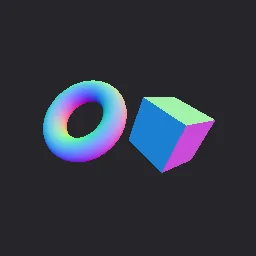
What this component contains
ATTRIBUTION.mdLICENSEREADME.mdcomponent.jsondemo.tscninspect_shader.pymaterial.tresnormal_debug_view.gdshaderpreview.pngtest_package.pyverification/native.json
How it works
- Shader type
- spatial
- Render modes
- unshaded
- Parameters
- mode (int = 0), depth_band (float = 0.5), position_cell (float = 0.25), flip_back_faces (bool = yes)
- Result
- Meshes coloured by their world-space normals (red, green and blue per axis) in the default mode.
- Renderers
- compatibility: compiled and rendered, forward plus: not verified, mobile: not verified
- Placement
- res://baltor/godot_shaders/normal_debug_view/
Recorded checks
godot 4.7.2.stable.official.ed1daf0bf
contract_staticengine_runengine_log_cleanshader_in_scenecapture_writtenrender_not_uniformshader_changes_pixels
Limits to consider
Debug output only: unshaded and not meant for final art. Tangent and binormal modes need meshes with tangents. Normals are the interpolated vertex normals after any normal map is ignored.