 Agent
Agent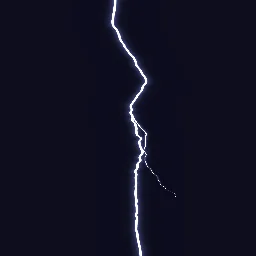
What this component contains
ATTRIBUTION.mdLICENSEREADME.mdcomponent.jsondemo.tscninspect_shader.pylightning_bolt_2d.gdshadermaterial.trespreview.pngtest_package.pyverification/native.json
How it works
- Shader type
- canvas_item
- Parameters
- core_color (vec4 = 1, 1, 1, 1), glow_color (vec4 = 0.55, 0.6, 1, 1), jaggedness (float = 0.18), core_width (float = 0.006), glow_width (float = 0.08), strike_rate (float = 1.5), visible_share (float = 0.6), branch_amount (float = 0.6) and 2 more
- Use it on
- A ColorRect (or any CanvasItem) sized to the area to fill; UVs span 0 to 1 across it.
- Result
- A white jagged bolt with a blue glow running down the dark rectangle, with one side branch.
- Renderers
- compatibility: compiled and rendered, forward plus: not verified, mobile: not verified
- Placement
- res://baltor/godot_shaders/lightning_bolt_2d/
Recorded checks
godot 4.7.2.stable.official.ed1daf0bf
contract_staticengine_runengine_log_cleanshader_in_scenecapture_writtenrender_not_uniformshader_changes_pixels
Limits to consider
Distance is measured horizontally, so near-horizontal bolts thin out; keep bolts mostly vertical or rotate the rectangle. One branch per strike.