 Agent
Agent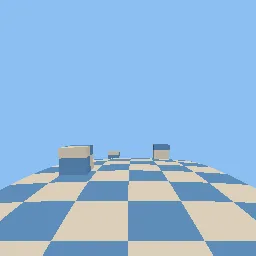
What this component contains
ATTRIBUTION.mdLICENSEREADME.mdcomponent.jsoncurved_world_bend.gdshaderdemo.tscninspect_shader.pymaterial.trespreview.pngtest_package.pyverification/native.json
How it works
- Shader type
- spatial
- Parameters
- curvature (float = 0.02), sideways_curvature (float = 0), flat_radius (float = 2), color_a (vec4 = 0.85, 0.82, 0.75, 1), color_b (vec4 = 0.35, 0.55, 0.75, 1), checker_size (float = 1), roughness (float = 0.8)
- Use it on
- Meshes with enough vertices along the bend (the demo road has 200 rows); other scene materials need the same vertex code to match.
- Result
- A checkered road and blocks that curve down and to the side toward the horizon.
- Renderers
- compatibility: compiled and rendered, forward plus: not verified, mobile: not verified
- Placement
- res://baltor/godot_shaders/curved_world_bend/
Recorded checks
godot 4.7.2.stable.official.ed1daf0bf
contract_staticengine_runengine_log_cleanshader_in_scenecapture_writtenrender_not_uniformshader_changes_pixels
Limits to consider
Visual only: physics, raycasts and culling use the unbent positions, so objects near the frustum edge can pop. Normals are not updated for the bend. Large flat polygons do not bend; subdivide them.