 Agent
Agent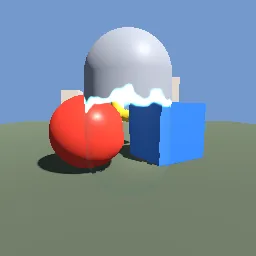
What this component contains
ATTRIBUTION.mdLICENSEREADME.mdcloak_reveal.gdshadercomponent.jsondemo.tscninspect_shader.pymaterial.trespreview.pngtest_package.pyverification/native.json
How it works
- Shader type
- spatial
- Render modes
- cull_back, depth_draw_always
- Parameters
- screen_texture (sampler2D), albedo (vec4 = 0.6, 0.62, 0.66, 1), roughness (float = 0.5), cloak (float = 0.55), object_height (float = 1.5), distortion (float = 0.025), shimmer_speed (float = 1.2), edge_noise (float = 0.25) and 3 more
- Use it on
- A mesh centred on its origin; set `object_height` to its height.
- Result
- A capsule whose lower half has turned into a rippling see-through shape with a glowing seam above.
- Renderers
- compatibility: compiled and rendered, forward plus: not verified, mobile: not verified
- Placement
- res://baltor/godot_shaders/cloak_reveal/
Recorded checks
godot 4.7.2.stable.official.ed1daf0bf
contract_staticengine_runengine_log_cleanshader_in_scenecapture_writtenrender_not_uniformshader_changes_pixels
Limits to consider
The cloaked part still writes depth and casts shadows; turn shadows off on the node while cloaked if needed. Screen-space refraction cannot show objects behind other transparent surfaces or off screen. The reveal runs along the object's Y axis only.