 Agent
Agent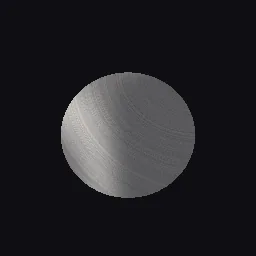
What this component contains
ATTRIBUTION.mdLICENSEREADME.mdbrushed_metal_anisotropic.gdshadercomponent.jsondemo.tscninspect_shader.pymaterial.trespreview.pngtest_package.pyverification/native.json
How it works
- Shader type
- spatial
- Parameters
- metal_color (vec4 = 0.82, 0.83, 0.85, 1), roughness_along (float = 0.08), roughness_across (float = 0.45), circular (bool = no), circle_center_u (float = 0.5), circle_center_v (float = 0.5), streak_density (float = 600), streak_strength (float = 0.25) and 2 more
- Use it on
- A mesh with UVs and tangents.
- Result
- Metal with a bright highlight smeared along the brushing, here as rings across a spun disc.
- Renderers
- compatibility: compiled and rendered, forward plus: not verified, mobile: not verified
- Placement
- res://baltor/godot_shaders/brushed_metal_anisotropic/
Recorded checks
godot 4.7.2.stable.official.ed1daf0bf
contract_staticengine_runengine_log_cleanshader_in_scenecapture_writtenrender_not_uniformshader_changes_pixels
Limits to consider
Ignores environment reflections: only scene lights give specular, so add a light or use Godot's built-in ANISOTROPY output when reflections matter. Ward's model is not energy conserving at grazing angles. Circular brushing needs UVs centred on the disc (the CylinderMesh caps qualify).